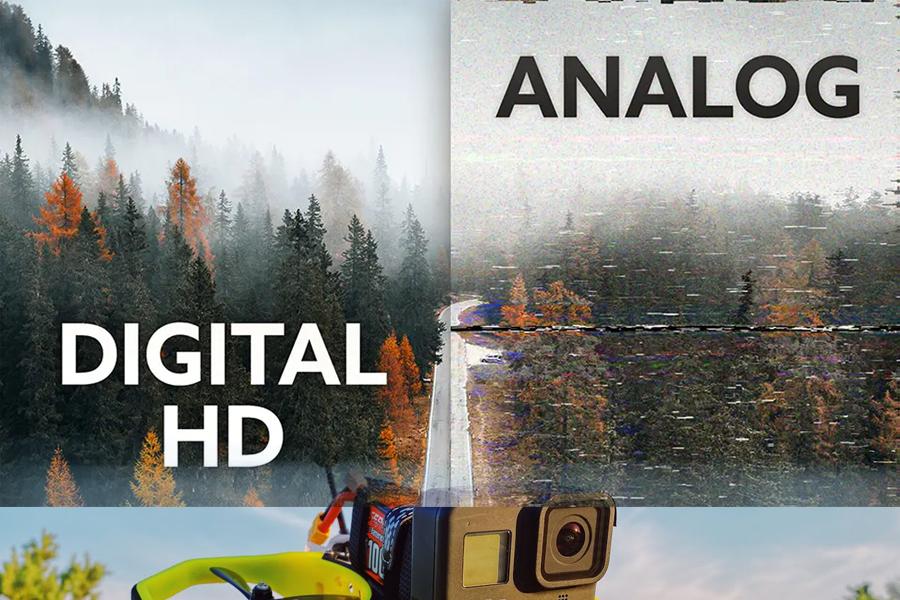
Understanding FPV video transmission is the first step every new pilot needs to take before buying any gear.
FPV video transmission is how the live feed from your drone’s camera reaches your goggles. Every FPV build uses one of two kinds of system: analog or digital. The choice you make here affects your build cost, goggle compatibility, video quality, and latency. This guide explains both systems in plain language so you can make the right choice for your setup.
If you are completely new to FPV, start with our what is FPV guide before diving into transmission systems.
Quick Answer
Analog: Lower cost, lower latency, lower image quality. Best for racing and budget builds.
Digital: Higher cost, crystal-clear HD image, slightly higher latency (except HDZero). Best for freestyle, cinematic flying and pilots who prioritize immersion.
How FPV Video Transmission Works
Your FPV drone has a camera mounted on it — not the action camera for recording, but a dedicated FPV camera with a wide field of view and ultra-low latency. This camera feeds a live video signal to a video transmitter (VTX) also on the drone. The VTX broadcasts that signal wirelessly to a video receiver in your goggles, where you see it in real time as you fly.
FPV video transmission comes in two forms — analog and digital — and the system you choose determines your goggles, your camera, and your entire build direction.
The entire loop — camera captures image, VTX transmits, goggles receive and display — needs to happen fast enough that there is no noticeable delay between what the drone is seeing and what you are seeing. That delay is called latency, and it is one of the most critical specs in an FPV system.
Analog FPV Transmission Explained
Analog FPV video transmission is the original technology that built the FPV hobby. It transmits video as an electrical signal in the 5.8GHz frequency band — the same way old TV broadcasts worked. The radio link itself adds almost no delay; once you include the camera and the goggle display, analog runs roughly 10–20ms glass-to-glass. That is why many racing pilots still prefer it: the response feels instantaneous and direct.
The trade-off is image quality. Analog signals degrade as distance increases or obstacles get in the way, producing the characteristic static, grain, and color bleeding that anyone who has watched classic FPV racing footage will recognize. Even in perfect conditions, the transmitted picture is standard definition (roughly 480 lines in NTSC) — far below HD, whatever TVL rating the camera carries.
Analog System Components
- FPV camera — small, lightweight, wide FOV (e.g. RunCam Phoenix 2, ~$25–$30)
- VTX (video transmitter) — broadcasts the signal at 5.8GHz. In the US, most analog VTXs need an FCC amateur radio (Technician) license to operate legally
- Analog goggles — receive and display the 5.8GHz signal (e.g. BETAFPV VR04, Fatshark Recon, Skyzone)
See our best FPV cameras guide for our top analog and digital camera picks at every budget.
Analog Pros
- Ultra-low latency — feels instant
- Cheapest system to build
- Universal — any analog camera, VTX and goggles work together
- Signal degrades gradually — you get a warning before losing feed
- Lightest components available
Analog Cons
- Low image quality — grainy, soft video
- Subject to interference and static
- Not suitable for recording — DVR quality is poor
- Increasingly dated as digital improves
Digital FPV Transmission Explained
Digital FPV video transmission converts the camera’s video into digital data, compresses it, transmits it wirelessly, receives it, and decodes it — all in roughly 15–30ms on premium systems. The result is a crystal-clear HD image that looks like watching a video game rather than an old VHS tape. The difference seeing digital for the first time after flying analog is genuinely shocking.
The main digital systems in 2026 break into two tiers. Premium digital — DJI (O4 Air Units), Walksnail Avatar, and HDZero — costs roughly $350–$800+ for an air unit and goggles together. Budget digital — led by BETAFPV’s ArtLynk system (P1 Air Unit + VR04 HD goggles, under $200 bundled) and the Caddx Ascent — brings HD video to roughly analog-price territory, making digital FPV accessible to budget builders for the first time, at the cost of higher latency (around 60ms).
Among the premium systems, DJI dominates premium digital in terms of adoption and image quality. Walksnail is a strong alternative with good performance. HDZero focuses on latency — it skips the heavy compression the others use, getting latency down to analog levels (under 3ms on its latest goggles) with a picture sharper than analog, though not as detailed as DJI or Walksnail. Which of these digital FPV video transmission systems fits you comes down to budget, latency and the goggles you want.
Digital System Components
- Digital VTX + camera combo — integrated unit (e.g. DJI O4 Air Unit Pro, Walksnail Avatar VTX, BETAFPV P1)
- Digital goggles — must match the system (e.g. DJI Goggles N3 or Goggles 3, Walksnail Avatar HD Goggles X, BETAFPV VR04 HD)
- Note: DJI is a closed system — DJI air units only work with DJI goggles. Walksnail’s native feed needs Walksnail goggles, though the Goggles X can add analog and HDZero with extra modules. ArtLynk is the most open, shared across several brands.
Not sure which goggles to buy? Our best FPV goggles for beginners guide covers every system and price point.
Digital Pros
- HD image quality — crystal clear
- No static or interference in normal range
- Some systems record onboard (DJI O4, higher-end Walksnail)
- Far more immersive flying experience
- Signal drops cleanly rather than degrading gradually
Digital Cons
- More expensive — VTX + goggles investment
- Mostly locked to one ecosystem
- ~15–30ms latency on premium systems, ~60ms on budget (vs ~10–20ms analog)
- Generally heavier than analog components
- Foreign-made systems face FCC Covered List limits — US stock is being sold down
- Signal cuts out completely at range limit
Analog vs Digital: Side-by-Side
| Analog | Digital | |
|---|---|---|
| Image quality | SD (grainy) | HD (crystal clear) |
| Latency | ~10–20ms | ~15–30ms premium / ~60ms budget (HDZero <3ms) |
| Entry cost | Low (~$80–$150) | Budget ~$200 / Premium $400+ |
| Ecosystem | Open — any camera / VTX / goggles | Mostly system-locked |
| Best for | Racing, budget builds | Cinematic, immersive flying |
| Recording | Separate action camera needed | Some systems record onboard |
Which System Should You Start With?
Start with Analog if:
- You are on a budget and want to minimize upfront cost
- You want to learn to fly before investing in premium gear
- You are interested in racing
- You want maximum component flexibility
Start with Digital if:
- Image quality and immersion are your top priorities
- You are building a cinematic freestyle rig from the start
- Budget allows for the higher entry cost
- You want onboard recording capability without a separate action camera
Frequently Asked Questions
Does latency really matter in FPV?
For freestyle and cinematic flying, premium digital’s roughly 15–30ms is imperceptible to most pilots. For racing at high speed through tight gates, analog’s ~10–20ms or HDZero’s under 3ms gives a genuinely sharper response. Budget digital at around 60ms is fine for cruising and learning but noticeable in tight gaps. If you are not racing, premium digital latency is a non-issue.
Can I use digital goggles with an analog system?
Usually not. DJI goggles can’t receive analog at all, and analog goggles can’t receive digital. The exceptions are HDZero goggles, which have an analog receiver built in, and the Walksnail Goggles X, which take analog with an add-on module. Switching a quad from analog to digital means replacing the VTX and camera on the drone, and usually your goggles too.
What is the cheapest way to start digital FPV?
In 2026, the cheapest standalone digital system is BETAFPV’s ArtLynk — the P1 Air Unit paired with VR04 HD goggles bundles together for under $200. For the DJI ecosystem, the cheapest current route is the standard O4 Air Unit (~$109) with DJI Goggles N3 (~$229) — the older RunCam Link and Goggles Integra are no longer sold new in the US. Walksnail sits between the two on price.
Is analog dead in FPV?
Not yet. Analog is still widely used in racing and by budget-conscious builders. The components are cheap, universally available, and the ultra-low latency is genuinely preferred by competitive racers. Analog will continue to serve its niche even as digital becomes the default for freestyle and cinematic flying.
Ready to Choose Your FPV System?
Going DJI? Our comparison covers the current O4 air units against the discontinued RunCam Link. On a budget, ArtLynk is the cheapest way into HD.
Now that you understand FPV video transmission, read our DJI O4 Air Unit vs RunCam Link comparison if you’re going DJI, or our best FPV goggles 2026 guide to compare every system.